Showing posts with label Photoshop. Show all posts

Saturday, January 10, 2009

Create your own motion

So you took a photo of the car, but it looks boring like this:

car_side

You want to make the car look like it's moving, but you have no friends to either handle the camera while you drive or drive the car for you as you know you're the better photographer. However you do own Photoshop...

Select the car with a lasso or other freehand selection tool, and apply some motion blur:

car_side_motion_part

This looks kinda weird for two reasons:

1. You can see through the windows and nothing is "moving" here.
2. The tires are not rotating

So add the windows into the original selection to make sure what you see through the windows moves along with the rest of the background. For the tires, simply select them and apply radial blur.

car_side_motion

et voilá, your car is moving. OK there is a third reason it still looks weird, there's no driver... who needs that level of reality anyway.

Sunday, July 27, 2008

Kids

baseball

I've always thought that working with kids would be very difficult. When I got asked to do the team photos for a kids baseball team, I was kind off apprehensive about it. Well I learned one thing, if there's a coach involved there are no problems... When I arrived at the field there were 9 kids running around the field playing around as kids do. Introduce myself to the parents and coach. Get out my gear take a few practice shots to check everything is working OK. When coach asks me if I'm ready to go, and my answer is yes, he bellows out "ALRIGHT EVERYBODY, LINE UP AT THE PLATE, 4 IN FRONT ON YOUR KNEES 5 IN THE BACK STANDING LET'S GO!!"

Poof 10 seconds later the kids are lined up, and 2 minutes later the group shot is done. He then tells all the kids to line up at the fence so they can all step up to the plate for individual shots... Thanks Coach! Looking forward to working with you again...

I'm really happy with how the composite worked out as well. I originally did one where the individual photo was just framed in, but after spending a little more time and removing the background from the individual photo, the final results is much more spectacular.

p.s. In case you wonder: yes I have the parents permission to publish this photo online, and no it's not the kids real name or number...

Wednesday, May 28, 2008

More Motion

composite3

Another great sport to capture with a fast camera. The Photoshop work takes a little longer with the more complex background, but it's well worth the effort.

Friday, May 23, 2008

Old & New

chris_and_son

chris_and_son_old 

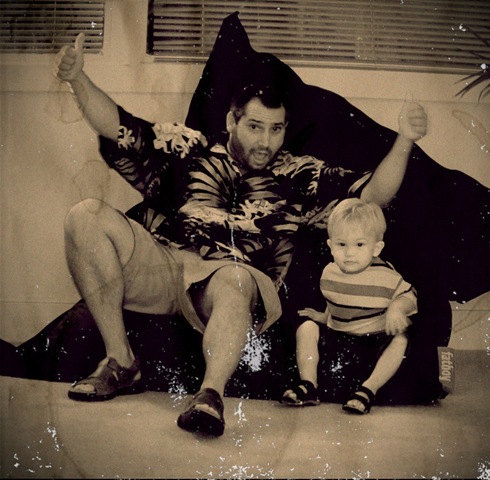
So much fun with Photoshop... Read some tips on how to make photos look old. Some of the basic Photoshop techniques like adding noise etc. are good, but just don't make it look really old. Using some more manual techniques like scanning some coffee stains & crumpled paper and using overlay layers of these on the original pictures create a much more realistic final result...

Sunday, May 11, 2008

Sculpture

eric-body

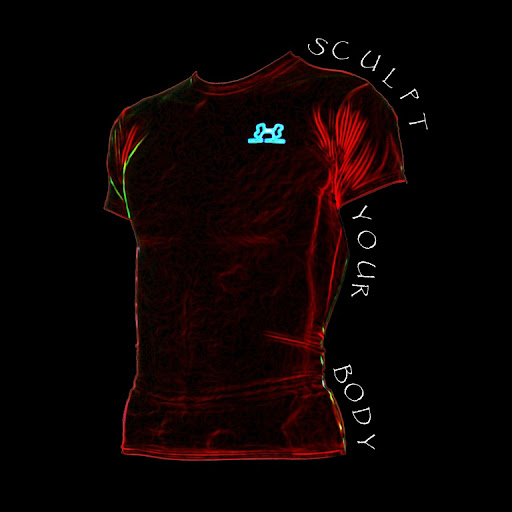
Cutting out the torso and then applying a series of Photoshop effects (can't remember exactly which ones), and you end up with something looking like a sculpture made from weird colored stone..

Tuesday, May 6, 2008

Athlete


I currently have the pleasure of following a body builder on his pre-competition season training. Although I never understood the reasoning behind body building (then again he doesn't understand why I like to run distance), the kind of dedication that goes into this training is admirable... The photos were taken with my brand new D200, with a 18-200 AF-S VR lens. The VR makes it a lot easier doing panning shots, tracking the subject. The "merge photo" function in Photoshop makes easy work of putting a series into one picture.

Taging


One of my first attempts at a personal tag... I got the idea when I was watching a brush artist in Biloxi making T-Shirts using airbrush. I love the effects you create with airbrush. And using Photoshop brushes & vectors you can create and modify to your hearts content (without messing up the neighbour's wall)!

Sunday, May 4, 2008

Portfolios

Here a few links to some photo/graphics series I've done...

The first one is of series of pictures taken during my last in Sweden with an Olympus u720sw. It's a collection of very random pictures...

Last Month in Sweden

The second series is of a photo session taken for a gym in New Orleans. The trainer wanted to create a scrapbook to put on display in the gym showing what the different classes were all about. All of the pictures taken with a Nikon D40x and SB400 flash where used

Bootcamp

The third series is of a bunch of CD covers I put together using Paint Shop Pro (my favourite program for creating graphics prior to me getting really started on PhotoShop).

CD covers

Saturday, May 3, 2008

Tattoo


A friend of mine was (and still is) dubbing over getting a Tattoo. So I messed around with Photoshop so he could get a feel for what it would look like... I didn't have anything hi-res to work with, so it doesn't get any better than this...

Wednesday, April 30, 2008

Photoshop workshop


This is the result from following a workshop published in the Advanced Photoshop magazine. The only photo bit is the tree line, which was taken near Wolfheze in the Netherlands, everything else is pure Photoshop work. The surface of the planet needs some work, but I'm real happy with the treeline reflection in the lake.